
How a Touch Screen Kiosk Works
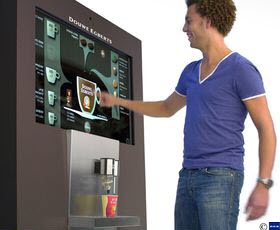
A touch screen kiosk functions similar to a standard PC and requires action from the user to move from page to page. Software, designed specifically for kiosk applications, will respond to human touch and allow a customer to view information or make a purchase.
Touch screen kiosks is where technology meets necessity
A touch screen kiosk may look like something you would have seen on Back to the Future in the 80s, but today, it’s a must-have communication device in major cities, like the Big Apple. After the recent devastation of Hurricane Sandy in 2012, NYC residents were left stranded without power to charge their smartphones. This may have been one of the only times in the past decade that New Yorkers were in dire need of payphones.
Beyond emergency use, New York City representatives are hoping to modernize sidewalk payphones before they become obsolete altogether. 250 New York City payphones will soon be equipped with touch screen technology to transform them into interactive communication devices to increase public appeal.
New York touch screen payphones will benefit both the city and the user; New York City officials expect to generate revenue from sidewalk touch screen payphones through promotions, advertising, transaction fees, and data aggregation.
Understanding how a touch screen kiosk works
The way a touch screen kiosk works is quite simple:
- A person approaches the kiosk and touches the monitor to get started.
- The on-screen menu will present the user with choices.
- The user can navigate the screen using a pointing device - their finger, an attached stylus, or a pen.
- Touch screen technology then uses light to determine where a finger or stylus is on the screen at a point in time.
- Pressing the touch screen kiosk prompts the machine to display the next page.
The most common touch screen kiosk on the market, resistive touch screens, feature a glass or acrylic panel with two layers separated by electrical current. Touching the screen activates the kiosk. In lieu of a traditional keyboard, a touch screen kiosk will display a virtual keyboard that can be shrunk or expanded as needed.
Resistive touch screen kiosks are durable and provide high touch resolution, but the clarity is low and sharp objects could harm the layers and the sensitive display. Resistive display technology is typically used in the point-of-sale market and allows people to activate it with fingers, credit cards, gloved hands, and styli.
With a touch screen kiosk, you don’t have to concern yourself with wear and tear on an external keyboard. Touch screens have a very long lifespan - allowing you millions of touches for all display parts - and can work across most operating platforms from DOS and Windows to Linux and Unix.
Uses and costs
Kiosks are designed to serves a variety of businesses and customers. For every service you provide, there is likely a kiosk available to accommodate. Here are a few examples:
- Bill Payment Kiosk $600
- ATM $2,000.00
- Photo Printing $895
- All-in-one Cash Payment Kiosk $900
- Tabletop $937
Touch screen kiosks can be used to improve daily processes in almost any setting, including fast food restaurants, recruiting companies, supermarkets, visitor’s centers, and even the DMV. Since more than 1 billion people now own smartphones, you can rest assured that your customers will be comfortable with accessing information or purchasing a product using touch screen technology.
Ready to Compare Interactive Kiosks Price Quotes?