
Buyer's Guide
Access Control Systems Introduction
Access control systems admit authorized personnel into various parts of your business while keeping unauthorized individuals out. Systems can range from electronic keypads that secure a single door to large networks that cover multiple buildings and parking lot gates, integrate with time and attendance systems, and offer numerous levels of security.
The increased security provided by a modern access control system is important to many types of businesses. For example, schools, colleges, and businesses working with government contracts are investing in access control systems. They are doing so because these systems not only secure your property, they also simplify facility management: no need to replace lost keys, hunt down old keys from terminated employees, or wonder who has access to which areas.
This BuyerZone Access Control Buyer's Guide will help explain the basics of an access control system, the types of identification available, how to choose a system, and what you can expect to pay.
The first thing to do is make a list of everything you expect and/or need the system to do. In the following section, we'll walk you through the planning stage and show you how to allow for a wide range of factors in the most cost-effective way possible.
How to Prepare for a Purchase
Before you start investigating access control systems, you should determine what purpose the system will serve. The most basic role of an access control system is to keep out anyone who’s not supposed to enter an area. This can be your front door, a parking garage, a server room, a personnel records room, or any other sensitive area. Such commercial access control systems are much more robust than residential security systems, so make sure your purchase aligns with your needs.
Some access control systems are used to track when employees come and go. These systems still only grant access to authorized users, but the focus is more on time tracking than airtight security. For this application, you'll need an access control system that is compatible with your time and attendance software. If your staff is mostly salaried, this component won't be nearly as important.
Other systems you may need to connect to your access control system include Monitored alarm systems or CCTV (closed circuit television) systems. Make sure you include any connectivity requirements in your initial conversations with access control vendors.
Finally, consider how secure do you need the system to be? A basic system usually features a keypad or swipe card. Higher security applications may require multiple means of authentication: a card and thumbprint, for example. However, added security comes with added expense.
Sizing your system

Once you understand the primary role your access control system will serve, think about the number of doors you need to secure. Simpler installations may cover just one door: a server room with an electronic keypad lock is a common example of a basic access control system. Remember that not every door has to have access control; you can leave some locked and administer keys to appropriate personnel.
If you plan ahead when purchasing your system it will be easier to expand later. The smallest systems, designed for one or two doors, are not very adaptable. But many four and eight door systems can be linked together when you need to expand.
Once you are certain about the number of doors you want to secure, gather information on each one. The physical makeup and use of your doors will dictate which types of locks and entry systems you use. Some questions to consider:
- Are some doors for customers, and some only for employees?
- Are the doors wood, steel, aluminum, or glass?
- Are any designated as fire doors?
- Do you have any garage doors or parking lot gates to control?
Networked vs. standalone systems
For larger installations, especially those that include more than one site, you'll want a system that can be operated over a network. Networked systems enable you to manage security at all locations from a central point. The alternative is a standalone system, which operates only on a single door.
Within a networked system, all secured doors communicate with a central computer. This allows you to centrally manage every door from a single location within your building and quickly lock them in the case of an emergency. If the central computer is attached to your company network, you can also control doors remotely from anywhere else within your company's network.
Standalone systems must be programmed on a door-by-door basis, which can become a hassle as you secure more doors. The primary advantage of standalone systems is that they're more affordable than networked systems.
Free exit vs. controlled exit systems
Another key distinction in access control systems is the difference between free exit and controlled exit systems. In a free exit system, there is no requirement for leaving a secure area. The system either detects someone approaching an exit (usually with motion sensors) and unlocks the door, or has a release button or bar that allows people to leave.
Controlled exit systems use the same security for travel in both directions: employees have to enter the code or wave their card to get in or out of the secure area. By law, access control systems must be configured to allow people to exit if the system fails or power goes out. Controlled exit systems increase both security and your overall costs.
While it's critical for your system to maintain the necessary levels of security throughout the building, having the proper combination of locks and credentials can simplify the process of moving from one area to another for authorized employees.
Types of Credentials and Locks
There are two primary components to a security access control system: locks, and the credentials used as a key to grant access.
First, you need credentials for authorized users to identify themselves and/or unlock the door. The various types include:
- Keypads are common for single door security access and less costly security systems. They're easy to use but less secure, since users may have a tendency to write down the entry code or lend it to others. Keypads also don't provide detailed audit trails unless you assign each employee an individual code.
- Card readers are the most popular option in commercial access control. They're very manageable and, if lost, simple to deactivate and reissue. Card readers can also be combined with photo IDs for additional security.
- Key card access uses RFID (Radio Frequency Identification) technology and works from one inch to three feet away from a sensor. Sometimes referred to as proximity cards, they’re the most common form of credential used. Because there's no contact between the card and reader, they're very reliable and durable. Another benefit is the card’s affordability.
- The automobile tag is a specialized type of proximity card is that allows access to a parking facility without requiring the driver to open their window or get out of the car. Automobile tags can work at hundreds of feet away from a sensor.
- Magnetic stripes or barcode cards can be used for identification purposes and represent a money-saving option if your company is currently using them. In many cases, they can simply be configured to your new security access system.
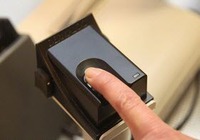
- Biometric systems rely on physical characteristics of the users for identification such as fingerprints, handprints, or even retinal scans. These offer the ultimate security, as well as a hefty price tag. Biometric systems may seem invasive to employees forced to use them constantly. They're also unreliable outdoors, so they're not a wise option for exterior security access.
- Smartcards carry vast amounts information on the card itself, such as employee records or spending account balances, instead of just an ID number that references a database. They get some good press but haven't made much progress into access control -- yet. In the future, as costs decrease and interoperability between different types of systems increases, their popularity may rise, but for now they remain a niche solution.
Other types of sensors can be used in free exit systems: loop detectors, photo cells or beams, and motion detectors all function by detecting a vehicle or person approaching an exit and unlocking a door.
Locks and gates
You’ll also need locks that the security system can control electronically. The two main options for locking standard doors are electric strikes and magnetic locks. Electric strikes are generally cheaper and better for free exit doors. They’re also more appropriate for standard wooden or steel doors. Magnetic locks are advantageous for aluminum and glass storefront doors, as well as for controlled exit situations and emergency exits.
Often, door hardware will include sensors that detect when a door opens and can send an alarm signal if it’s opened without clearance. Systems can also sound an alarm if a security access door is propped open for a specified amount of time.
To restrict vehicle access, there are several options. The most secure are full garage door openers, then various types of gates. Sliding or swinging gates, depending on available space, move aside to allow a vehicle into a parking lot. More common and less expensive are barrier arms of wood, plastic, or metal that control the flow of traffic into a parking facility.
Access control gates can be broken up into two subcategories: residential or commercial. Residential gates offer:
- Improved security
- Keypad and/or telephone access entry
- Sensors and locks
Commercial gates offer:
- Higher-level security
- Automatic vehicle tag and card readers
- Locks
- One-way spikes
- Battery backup systems
Some companies rent security fences for special events and construction sites. Temporary access control equipped fences can prevent theft, manage liability, ensure security and privacy, and aid in crowd control -- without requiring the investment in a permanent solution.
Without an intuitive, usable software suite, an access control system can create more headaches than it solves. So your next step is to pair your desired set up with the best platform available.
Access Control Software and Features
One of the distinguishing features between competing access control systems is the computer software used to run them. The software lets you set access levels for each ID and door, view reports, and conduct audits to see who used a door at a certain time.
Make sure it’s easy to understand and use: access control systems should eliminate hassle, not create it. Ask for a demonstration of the software and observe how to add new employees, change access levels, create groups, and find detailed reports. Making an informed decision regarding the software is imperative.
Match the software with your computers’ operating system carefully: some access control systems only work with specific versions of Windows or other operating systems, so know exactly what operating system you’re running before choosing the appropriate software.
Most access control system software is powerful enough to handle the needs of companies up to 1,000 users and possibly more. When you need to manage multiple shifts, several thousand employees, and hundreds of doors, overall complexity increases. At that level, ODBC-compliant (Open DataBase Connectivity) software is a smart upgrade. It connects to your existing payroll, time and attendance, and other HR and security systems.
Managed Access Control (MAC)
You may want to consider using managed access control (MAC) software. Instead of running the software on your own computers, MAC is centrally hosted by your seller and accessed through your web browser.
There are significant tradeoffs involved. The main advantages are top-quality data and power backup systems at MAC data centers mean your system will almost always be up and running. Plus, your staff doesn’t have to maintain the servers that run the MAC. The main disadvantage is if your Internet goes down, it’s not possible to make a change in the database. And managed access control usually carries a monthly fee.
Keep your needs and resources in mind when choosing either software or managed access control. If you don’t have much technical expertise on-staff, MAC can be ideal, but you might prefer to have complete control over the setup and maintenance of your access control software.
Additional access control system features to consider:
- Timing – Lets you set specific times when a door should lock and unlock. Particularly useful for doors that are open to the public at some times but only to employees at others.
- Tracking – Any computerized access control system will do some basic tracking of usage. Check out the available reports and see if they provide the level of detail you need.
- Battery backup – Keeps your premises secure for hours, even during a power failure.
- Template layouts – Lets you create a graphic blueprint of your building and point and click your way around to change permissions for different doors.
- Badge printing – The seller may be able to supply a specialized printer so you can create new cards as needed, with or without photos.
- Audit trail – Provides a time and date stamped record of every attempted and successful opening of a lock. Audit trails are often used in server rooms or supply closets. Sometimes audit trails can back up time and attendance systems.
- Mobile security - Offers electronic access control at remote locations. Solutions include an intuitive touch screen to allow users to enter the number of persons entering a facility. For special events or temporary needs, mobile terminals and turnstiles are also available.
- Swipe cards and turnstiles - You can install a proximity reader on a turnstile to allow keycard access.
For some types of access control systems, you may also want voice communication capabilities, such as an intercom or a telephone-entry system. A simple intercom allows visitors to talk to a central control booth. Telephone-entry systems, common in large apartment buildings, allow visitors to dial a specific unit to request entry and let residents unlock the door using their phone.
Often specializing in your industry or one that’s similar, a qualified seller can advise you on the best setup and how to save money on the system overall.
Choosing a System Seller
As with any major business purchase, it’s worth taking the time to ask relevant questions when choosing an access control seller. You want a seller who is large enough to be stable and provide timely customer support when you need it, yet small enough to be responsive to your needs. Flexibility is also important: the seller should be able to adjust to your specific requirements.
The best sellers will ask you guiding questions as well. They’ll walk you through the specification process and help you find the solution that best fits your needs. It’s not necessary for a seller to see your facility, but they may do a site visit or ask you to send digital photos of specific entry points. Avoid “salesy” sellers who create a sense of urgency to purchase right away.
Most access control sellers work with a wide range of customers, but you should look for one that has experience in your industry. For example, it’s unwise to work with a company that handles mostly residential systems. Businesses and public entities need commercial-grade access control. Many manufacturers produce residential versions that are considerably cheaper, but they are not designed and constructed to withstand the heavy use of a commercial system.
It’s advisable to look for a seller who supports multiple brands of hardware and software. Access control hardware is fairly standardized and will work with most controllers. Controllers and software are more specialized, so make sure the dealer you choose has significant experience installing and supporting the brands you choose. Factory certification from manufacturers indicates a greater level of training and support, but it’s not required.
Integration and installation
In addition to providing you with the right products and appropriate support, the seller you choose will be responsible for installing your access control system and integrating it with related systems.
Keep in mind some proprietary systems do not integrate.
No standard connectivity exists between access control and alarms, time and attendance, video surveillance, and HR software, so there will always be some custom work involved in creating links between these systems. Your access control seller should be prepared for this and have experience with the type of systems you want to connect.
There are local and national codes governing the types of locks and hardware that can be used on fire and exit doors, so check with your seller to ensure your system is in compliance with local ordinances. It’s not necessary to work with a local seller; you just need assurance that your seller is knowledgeable about these regulations.
Installation varies from a few days to two weeks, depending on the total number of gates and doors being controlled by your system. The seller will install the software on your computers (or show you how to connect to MAC), set up your initial users, and install the locking and detection hardware.
Training on how to manage the software is included, but the extent can vary from seller to seller. For a basic system, a demonstration how to create cards and reports should be sufficient, while larger systems, may dictate comprehensive training. Be sure to inquire what kind of support the service contract entails.
Before speaking with a seller, know what you should expect to pay. The following prices have been compiled through a variety of BuyerZone customers and national sellers.
Access Control System Pricing
Arriving at a good estimate for access control system pricing is difficult. Most access control sellers should discuss your needs in detail before providing you with estimates.
That said, there are some general costs you can keep in mind. A complete keypad or card-based access control system for a single door is typically $1500 to $2500 installed.
The average price per door or entryway for an access control system runs $1,500 to $1,700. The more doors you add, the lower the per-door pricing is. Systems come in 1, 2, 4, 8, or 16 doors per panel.
These prices include everything – the hardware, software, and installation. The only exception is the cards themselves, which are usually priced separately. Blank cards run $5-$6 each; printable cards $8-$9; and key fob cards about $9 each.
The full range of options is much larger. Integrated locks with keypads, designed as standalone access control points, can be purchased for as little as $400.
Purchasing a complete access control system with electronic locks, biometric technology, and full network capabilities could cost more than $10,000. Biometric technology, which includes iris scanners, is used mostly by the government.
Access control system pricing increases when you start including additional components such as photo ID printers, door prop alarms, and higher-security locks. While the prices listed here can help you get an idea of your budget, your total costs will change throughout the project as you add and remove components.
Your access control system pricing should include email, telephone support, and onsite maintenance for the first year. Some sellers provide lifetime support for products they install. Most dealers will also offer extended warranties (1-5 years) or maintenance contracts, but the basic manufacturer’s warranty is often sufficient for access control hardware. The components are relatively simple and don’t have many moving parts, so they don’t tend to break down easily.
One of the biggest mistakes buyers make today is buying a cheap system based on price alone that doesn't have the technology or support to provide adequate security protection. While it is important to shop competitively based on price, make sure the system you choose is reliable and worth the monetary investment.
We've gathered a few more tips to help make sure you’re getting the right access control system for your business, as well as a quick review on the three most important elements in any system.
Buying Tips for Card Access Control Systems
We recommend these three criteria to make the best selection in your access control system:
- Authorization: Choose a system that will effectively grant secure authorization to necessary users at single or multiple entry points.
- Accountability: Choose a system that can record and log employee and visitor actions at specific entry points in the building.
- Identification: Choose a system that will effectively verify identity and permit access based on levels of security clearance.
Additional buying tips:
- Compare prices on centrally managed vs. non-centrally managed access control systems. What’s the best choice for your current and future business model?
- Find out what kind of support your seller offers with the sale and installation.
- Use a licensed security company, not an electrician, for the installation.
- Consider the design and practicality of the access control system for your business.
- The system you purchase should be scalable; it should give you the ability to add on more doors in the future.
- All the doors in the system must be compliant with fire codes and local ordinances.
- Do your due diligence regarding the software manufacturer. Your seller should be able to confirm the manufacturer’s reputation and performance.