
Buyer's Guide
Introduction to Wide-Format Printers and Plotters
Printing is a consistent expense for all businesses. Maybe you can get by sending the occasional oversized print job to a copy shop. However, if you often print blueprints, banners, or other documents over two feet wide, purchasing a wide-format printer (sometimes called a plotter) is an excellent investment. These machines print in either black and white or color, on a wide range of materials, in widths of 24" to 60" or more.
There are two primary markets for wide-format printers. The first is the architecture, engineering, and construction (AEC) industry, which has long used plotters for blueprints and other technical documents.
Terminology
While it's not technically correct, many buyers use the terms "wide-format printers" and "plotters" interchangeably.
Some individual dealers and manufacturers use both terms, typically reserving the term "wide-format printer" for high-end graphics production machines -- but in general, the two terms overlap.
The other market is for graphics printing. Print and design shops use wide-format printers to create large-scale banners, signs, textiles, custom fabric orders, and durable outdoor graphics for educational institutions, advertising agencies, retail stores, even the government. If your print volume is high enough your organization will benefit from acquiring a wide-format printer of your own.
This BuyerZone Plotters Buyer's Guide will give you the inside scoop on the basics of choosing a wide-format printer, what features to look for, and how much you can expect to pay.
Toner-based vs Inkjet Printers: What's the difference?

There are two primary technologies used in modern wide-format printers: toner based and inkjet.
Toner printers use a drum to transfer dry toner onto a print surface then fuse the toner to the paper using heat. Wide-format inkjet printers use heat to move droplets of ink through a fine mesh print head, spraying droplets of ink on the paper. These are also referred as thermal inkjets.
How you intend to use your printer may determine whether you choose toner or inkjet technology. Typically, toner-based wide-format printers are preferred for AEC applications, while companies with graphics applications lean towards inkjets.
Tip: No one makes plotters anymore: the term specifically refers to a machine that draws using a pen on a traveling arm. Improvements in inkjet and toner technologies have, thankfully, made these temperamental, expensive machines obsolete.
Essentially, your decision comes down to a wide-format printer intended for graphics or one that’s designed uniquely for engineering applications and CAD functionalities. The next step in the process is to pair the correct printer to your intended use then settle on a size.
Choosing the Wide-format Printer That's Right for You
The application you have in mind for your wide-format printer will influence your purchasing decision in many ways, so make sure you have a firm understanding of what type of printing you'll be doing and your print volume.
The most significant split in the industry is between printers for graphics and those for engineering applications or computer-aided design (CAD) work. Graphics printers are almost always color inkjets, and emphasize high resolution and the ability to print on multiple types of media. CAD-focused printers are more often monochrome toner printers, and are designed for faster, higher-volume printing.
More and more, toner wide-format printers can print in color. These printers have the speed and lower running costs of a monochrome toner printer but provide the color capabilities that previously were only available in inkjet. Keep in mind, however, that color capabilities can double the price of the printer.
Here's a breakdown of the most common applications of the two types of wide-format printers.
| Graphics printers | Engineering printers |
| Signs Banners Posters Photographs Canvas prints Textiles Pattern material |
Blueprints Floor plans Specification documents Photographic prints |
Sizing
After the application, size is the next most important consideration. Most wide-format printers can handle widths of 24" to 60", although 60" is rare. The most common widths are 24", 36", and 44". They print on rolls of paper that can be up to 300' long, or on individually fed sheets of paper. The size of the materials you need to print will help you decide what size printer you need.
The standard for engineering applications is 36" plotters; the 36" machine can handle the largest construction documents. Graphics printer sizing depends more on the type of printing you'll be doing. Grand-format printers, which can range from 60" all the way up to 16' wide, are designed for outdoor banners and large-scale projects.
Speed
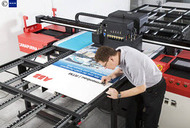
Today, toner printers are rated in D size prints per minute. A D size is 24 x 36 inches and is the most commonly used size. Inkjet printers quote in square feet per hour or minute because of their longer spooling time between prints.
Most modern printers have various print modes that allow users to trade print speed for print quality. Note that higher quality settings will take longer to print than the lower quality draft mode. Make sure your dealer explains the printer’s speeds in the measurements and at the print settings you need, so you understand the comparisons.
As a rule of thumb, if you have high volume color needs (such as over 2,500 D size prints per month), choose toner. If your printing needs tend to low volume, inkjet is suitable.
The speed of the actual printout is not your only consideration either. Find out how long it takes the printer to warm up after it has been sitting idle for a while. For some printers this can add minutes to your print time. Also, keep in mind that prints from an inkjet printer will need time to dry whereas toner prints will not.
Print quality
One specification some buyers put too much stock in is resolution. A printer with lower resolution but better technology can sometimes produce better-looking prints than another printer with higher resolution. Rather than dots per inch, the most important factor is the droplet size for crisp lines. Also, the more ink cartridges your printer uses determines the quality: the basic 5 ink (cyan, yellow, magenta and 2 black) isn’t as good as the 12 ink. Remember the Crayola boxes from your childhood? The 64 crayon box always gave you more options for quality than the 24 crayon box. This is a similar concept.
Seeing sample output is an important part of evaluating a wide-format printer. Try to get a sample output on the exact type of media you intend to use, including your brand of blueprint paper, the exact vinyl banner stock, or any other specific material that you'll be using. Printer performance can vary dramatically based on the medium being used. Email the seller with the sample you want printed. Have them print it out on the machine you’re considering and request they deliver it or mail it to you FedEx.
Once you have the basics sorted out, the next step is to review the many additional features available in a wide-format printer. Depending on your application, some of these bells and whistles have the potential to save you big chunks of time on each job.
Plotter Features to Consider
Here's a sampling of some of the most common features, most of which are now included as standard on modern machines.
Scanning/copying functionality
A major feature of some wide-format printers is the ability to scan and copy large documents. Some printers may come with this feature built-in; in others, the scanning capability is part of an upgrade module you can purchase separately. Approximately 2 to 3 inkjet companies make scanner components. If you definitely need a scanner, buy the scanner bundle from one of those companies.
Entry-level toner machines have scanners built in. For high-end toner printers, scanning is an optional add-on. Large-format scanning is a huge plus to AEC users: being able to reproduce full-sized blueprints in-house at any time provides flexibility and reduces the number of trips to the copy shop.
Adding scanning and copying capabilities will substantially increase your costs – see Plotter Pricing for details. If your scanning needs will be few and far between, it’s probably not worth the extra expense.
Software, drivers, and file formats
To get the best performance from your wide-format printer, you need to ensure that communications between the printer and your software are as direct as possible. There are two aspects to this: the drivers the printer offers, and the printer languages it supports.
Drivers are small pieces of software that get installed on your computer so it can run the printer accurately. Ask the dealer if the printer has drivers for the specific software applications (e.g., image software, CAD programs) you will be printing from. The answer should be "yes," but you you should also inquire if the drivers are certified by the software manufacturer. Certified drivers provide a extra peace of mind, and all the big brands sell certified drivers. Uncertified drivers will likely work, but you can't be sure without careful testing.
In terms of printer languages, you don’t need many. Postscript and PDF cover almost everything in the graphics market; in the engineering market you’ll need support for HPGL, DWF, TIFF, and PDF. All wide-format printers today come with Windows or Mac drivers. So basically, if you can see it on your desktop, you should be able to print it.
More features to look for
- Built-in accounting features are useful in situations where prints will be billed to different projects or clients. This is a top priority for many customers.
- Built-in paper cutter is a real timesaver, allowing the printer to automatically separate each print as it comes off the roll of paper.
- Multiple paper widths gives you flexibility – some printers even hold more than one size roll at a time, allowing users to print the size document they need without changing paper or printers.
- Media bins and catch trays let you walk away from big jobs, which can take hours, while the printer separates and organizes the output.
- Color scanning and color mark-ups are used on “as built” plans and help with notations.
- Scan and save features are necessary for projects that need to be called up again.
Tip: color processing
Trying to match existing colors exactly is a complicated process. For very precise color work, you may want to invest in a Raster Image Processor (RIP).
RIPs provide the highly accurate color management that's essential for lithographics or art that will be sold. However, RIPs are not needed for engineering work, nor are they required for every type of graphics printing. They can add several thousand dollars to your purchase price, so consider your needs carefully.
There are a couple critical issues to be concerned with when comparing potential sellers, especially if you plan on large print jobs that take place after-hours.
Choosing Wide-format Printer Dealers
The dealer you choose can have a big impact on your overall satisfaction with your wide-format printer. That's because service and support are the most important considerations. Whether you need a service technician to come out and repair a mechanical problem, or just have a question you need answered, the support offered by your dealership is critical.
It’s uncommon to visit dealerships now, thanks to YouTube demonstration videos and available web support. You should still find out what avenues of support your dealer offers: telephone or email-based help, online knowledge bases, discussion forums, etc. Also, inquire about hours of operation if you anticipate late-night printing sessions.
Definitely check references. Any reputable printer dealer should provide you with references to customers who purchased the exact model of printer you’re considering. Ask them how responsive the dealer is to service calls and how they rate the technicians' level of expertise. If the printer has had any problems, find out how these problems were resolved.
Other dealer considerations
Many large-format printer dealers carry lines from multiple manufacturers, allowing you to compare print quality from different brands for yourself. Getting sample output is essential. You should email your sample to the dealer and ask them to print it for you on the medium you’ll use. They can deliver or FedEx the sample to you.
While size isn’t necessarily the best indication of dealer quality and longevity may be. Small companies that have been around for a long time should be just as dependable as larger companies. Smaller dealers may offer a more personal touch, while larger dealers may have more of a selection.
It’s best to buy from a dealer that specializes in selling wide-format printers. Many dealers that focus on copiers, scanners, and standard-sized printers also carry a small selection of wide-format printers. Understandably, these dealers' expertise won’t focus on plotters. Reps from copier companies often have less experience and higher turnover. You're better off with an experienced dealer who understands the customer’s needs around wide-format printers.
Review the following wide-format printer prices so you know exactly how much others have paid for models similar to the one you’re interested in.
Pricing and Maintenance
Pricing for wide-format printers and plotters can span a huge range. The biggest variables are size and quality -- you'll see bigger price tags for more accurate color reproduction and higher resolution. There's also very dynamic pricing for inkjets that is influenced by dealer rebates and other factors.
Toner plotters are more expensive to purchase initially, but make up for that difference with their lower overall cost per page because they're cheaper to run. They also last for years. Inkjet printers cost less to purchase, but can go through ink at a prodigious rate, driving up your cost per page.
Be aware that today's inkjet printers have shorter lifespans than previous generations. You can expect to purchase a new inkjet machine every 3-4 years (as opposed to a toner printer that lasts 5-8, even 10 years.) Both have limits in technology and price point, so it's imperative to be clear on your business's printing needs.
Wide-format 24" inkjet printers start around $1200-$2000. Variables include rolls, stands, installation, brand, and geography. A 36" printer can range from $3200-$4700 and a 44" costs $3900-$7900 depending on the number of rolls. Color inkjets used for commercial production can run $15,000 and more.

For toner machines, new wide-format printers start at $11,000 and can top out at $65,000.
There is a very strong market for used toner-based equipment. The technology hasn't changed much and customers are satisfied with their reliable toner printers. Used toner plotters range from $5,000-$7,000 and come with the same warranties and service agreements as new machines. A used toner machine lasts at least 5-7 years, sometimes up to even 10 years.
Check costs for consumables
Remember that the initial purchase price is only part of the total expense of a printer: consumables, most significantly ink or toner, will be a part of your budget for years to come. Per-page costs are always higher with inkjets than toner printers: toner cartridges provide much more coverage than ink refills. Paper and other media costs are usually comparable across different plotter models. Sometimes you can bundle the consumables for toner machines: paper, toner, and service at a fixed cost per square foot. Not only is this more affordable, it ensures quality.
Ask your dealer for cost estimates, preferably per page or square foot. Then try to verify those costs elsewhere -- for example, by asking the customer references they gave you. And don't hesitate to look for third-party sources for ink and toner: while you should always turn to the dealer for service and repairs, you can sometimes get better deals on basic supplies from other sources. Just keep in mind that if the price seems too good to be true, it probably is. Many products are produced cheaply and roughly overseas.
Several major brands including Epson, Canon, and HP are instituting UMRP: Unilateral Minimum Retail Pricing. This is an industry-wide effort to regulate pricing and not be undercut by ridiculously low Internet prices.
Leasing
Many businesses prefer to lease their printer if they don't have the upfront capital to buy it. A lease generally has a low monthly fee, includes service and maintenance, and makes upgrading easy when new technology comes out. While leasing is very common, it's important to understand the difference between a lease rental versus a lease purchase. With a lease purchase, you lease to own and can expect to pay fair market value for your plotter at the end of the lease.
Maintenance and service agreements
Like copiers, wide-format printers require regular maintenance: cleaning, inspection, and replacement of worn parts. Keeping your printer well-maintained is the best way to prolong its useful life and make sure it runs smoothly. Some maintenance agreements only extend the printer's warranty -- covering repairs -- while others include toner, drums, and all other replaceable parts, as well as regular visits to your office by a technician.
For both toner and inkjet printers, you'll need to download periodic software upgrades, as well. These are included in your service plan.
Service agreements are typically priced per square foot printed per month. If you're new to wide-format printing, or if you'll depend on the printer for day-to-day production, we strongly recommend that you purchase the service agreement.
Make sure the agreement covers on-site labor, and see if guaranteed response times are included. Parts, if needed, should be guaranteed for next-day delivery.
BUYING TIPS
- Ask your prospective dealer how many wide-format printers they've placed in the field, and obtain references from businesses in your industry.
- Insist on a price protection period for your service plan for a minimum 3 years, and up to 5 years for high volumes. This safeguards your service from salesperson turnover and locks in your price.
- It's not wise to bundle a wide-format printer and small office copier on the same lease. These machines have vastly different life cycles.
- Never combine your lease to purchase with the service agreement. It ties you to that vendor and that machine. The vendor can inflate the service charges from the financing.